
Bug Report Template (Free Excel, Word & Google Sheets) + Examples
By GiveFeedback.ioUpdated 8 min readEspañol

A bug report template is the fastest way to get website bugs fixed on the first try. A developer who receives "the form doesn't work" has to ask four questions before starting; one who receives a URL, a browser version, three steps and a marked-up screenshot can usually reproduce the problem in minutes. The free template here works in Excel, Google Sheets and Word, and the examples further down show the difference between a report that gets fixed and one that gets sent back.
What is a bug report?
A bug report is a written description of a software problem that gives a developer enough information to reproduce it, understand it and fix it. For a website, that means where the problem happens, on which device and browser, how to trigger it and what should have happened instead. A good one can be acted on without a single follow-up question.
A bug report is not a complaint and not a feature request. "I'd like the menu to be green" is a change request. "The menu doesn't open on iPhone" is a bug. Keeping the two apart matters, because change requests usually need a budget conversation and bugs don't.
What should a bug report include?
Ten fields cover it: a specific title, the page URL, the browser and version, the operating system, the screen size or device, numbered steps to reproduce, the expected result, the actual result, a marked-up screenshot and a severity or priority. The first five tell the developer where to look; the rest tell them what to do.
| Field | What to write | Example |
|---|---|---|
| Title | Where + what, in a few words | "Contact form: Send button does nothing on mobile" |
| URL | The exact page address | https://example.com/contact/ |
| Browser and version | Name and version number | Safari 17.5 |
| Operating system | Name and version | iOS 17.5 |
| Screen size or device | Resolution or device model | iPhone 13, 390x844 |
| Steps to reproduce | Numbered, starting from loading the page | 1. Open the URL 2. Fill in all fields 3. Tap Send |
| Expected result | What should happen | The form is sent and a thank-you message appears |
| Actual result | What happens instead | Nothing happens; the button stays active |
| Screenshot or video | The problem, marked up | An arrow pointing at the button |
| Severity or priority | Impact and urgency | High: no leads can come in from mobile |
Why each one earns its place:
- URL: "the services page" can mean three different pages on a site with several languages, or with a staging and a live version. Copy the address bar.
- Browser, OS and screen size: many website bugs only happen in one browser or at one width. Without them, the developer tests on their own setup, sees nothing wrong and closes the report as "cannot reproduce".
- Steps to reproduce: a screenshot proves the bug exists; the steps show how to make it happen again. Start from a fresh page load and number every action.
- Expected vs actual result: this is what turns "it doesn't work" into something testable, and it sometimes shows that the request is really a change.
- Screenshot: a marked-up screenshot removes any doubt about which element you mean. Draw an arrow or a box on the exact spot.
Optional but useful: whether it happens every time or only sometimes, whether you were logged in and with which role, the browser language, and console errors if you can open the developer tools (Chrome explains how in its Console overview).
How do you write a bug report, step by step?
Reproduce the bug once, write down the exact steps from a fresh page load, note what you expected and what happened, record your browser, system and screen size, take a screenshot and mark the problem, and only then write the title. Report one bug at a time and check the list for duplicates before adding yours.
- Reproduce it. If you can't make it happen again, say so ("happened once, couldn't reproduce") rather than guessing.
- Write the steps, numbered from loading the page, one action per line.
- State the expected and the actual result in two short sentences, without a diagnosis.
- Note the browser and version, the operating system and the device or window size.
- Take a screenshot and put an arrow or a box on the problem.
- Write the title last: the place plus the problem, in about ten words.
- Search the tracker for duplicates before adding a new report.
Two habits make a big difference. Describe, don't diagnose: "the hero image is blurry" is better than "the image compression is wrong", because the cause is the developer's job. Say where it doesn't happen: "on desktop Chrome the same steps work" is one of the most useful clues you can give. Mozilla's bug writing guidelines make the same points for software in general.
What does a good bug report look like?
It names the page and the problem in its title, lists the exact URL and setup, gives numbered steps that anyone can follow, separates the expected from the actual result and points at the problem in a screenshot. A bad one says that something is broken and leaves the developer to find out what, where and on which device.
Bad example:
Title: Form broken

The contact form isn't working, please fix ASAP!!
The developer doesn't know which form (the site has two), on what device, what "not working" means, or whether it's urgent compared with everything else.
Good example:
Title: Contact form: Send button does nothing on iPhone (Safari)

URL: https://staging.example.com/contact/
Browser and version: Safari 17.5
Operating system and version: iOS 17.5
Device / screen size: iPhone 13, 390x844
Logged in? No

Steps to reproduce:
1. Open https://staging.example.com/contact/ on the iPhone
2. Fill in Name, Email and Message with valid data
3. Tap "Send"

Expected result:
The form is submitted and the message "Thanks, we'll be in touch" appears.

Actual result:
Nothing happens. No message, no error, the fields keep their content.
On desktop Chrome 129 (Windows 11) the same steps work.

Happens: every time (tried 3 times)
Severity: high (mobile visitors can't contact the client)
Screenshot: attached, Send button circled in red
The good report takes about two minutes longer to write and saves far more than that in back-and-forth.
Bug report template to copy and paste
Paste this into an email, a document, a Notion page or the tracker you use. It has the same fields as the downloadable template above.
Title: [Page/feature]: [what goes wrong], [where/when]

URL:
Browser and version:
Operating system and version:
Device / screen size:
Logged in? (yes/no, which role):

Steps to reproduce:
1.
2.
3.

Expected result:

Actual result:

Happens: [every time / sometimes / once]
Severity: [critical / high / medium / low]
Screenshot or recording: [attach, with the problem marked]
Notes:
Can you track bugs in a spreadsheet?
Yes. For a single website project or a small team, a spreadsheet works well as a bug tracker: one row per bug, with columns for the report fields, a severity, a priority, an owner and a status. The Excel template above is built that way, with dropdowns for severity, priority and status, and it works the same in Google Sheets.
To open it in Google Sheets, use File, then Import, then Upload (Google's instructions), and share the sheet with the people who fix and test. A spreadsheet starts to hurt when several projects run at once, when you need to attach many screenshots, or when people need notifications and a history of who changed what. That's the point to move to a real tracker; our guide to free bug tracking tools compares the free plans.
How do you get complete bug reports into Jira, Trello or another tracker?
The most reliable way is to stop retyping them. If clients and testers report through a visual feedback widget on the site, each report arrives with the screenshot, the URL and the browser details already filled in, and it can be created automatically in the tracker your team uses, so nobody copies emails into tickets.
Even with a template, non-technical people rarely know their browser version or screen resolution, and copying URLs and marking up screenshots by hand takes time. That's when you get "form broken", especially from clients reviewing a site during a client feedback round. The fix is to capture the technical fields automatically, so the reporter only writes what a person has to write: the steps, the expected result and the actual result.
GiveFeedback.io adds a "Give Feedback" button to your website with one JavaScript snippet. When someone clicks it (no account needed), the screenshot is taken (on a computer, after the browser asks permission to capture the tab), and they mark up a screenshot of the visible page with arrows, boxes, text, a pen or a highlighter, then add a title, a description and a type such as Bug. These template fields are attached automatically to every report:
- Page URL: the exact address, including staging subdomains.
- Browser and system: browser and version, operating system and version.
- Screen: the screen resolution.
- Locale: browser language and time zone.
- Console: the page's recent console messages, errors and failed requests.
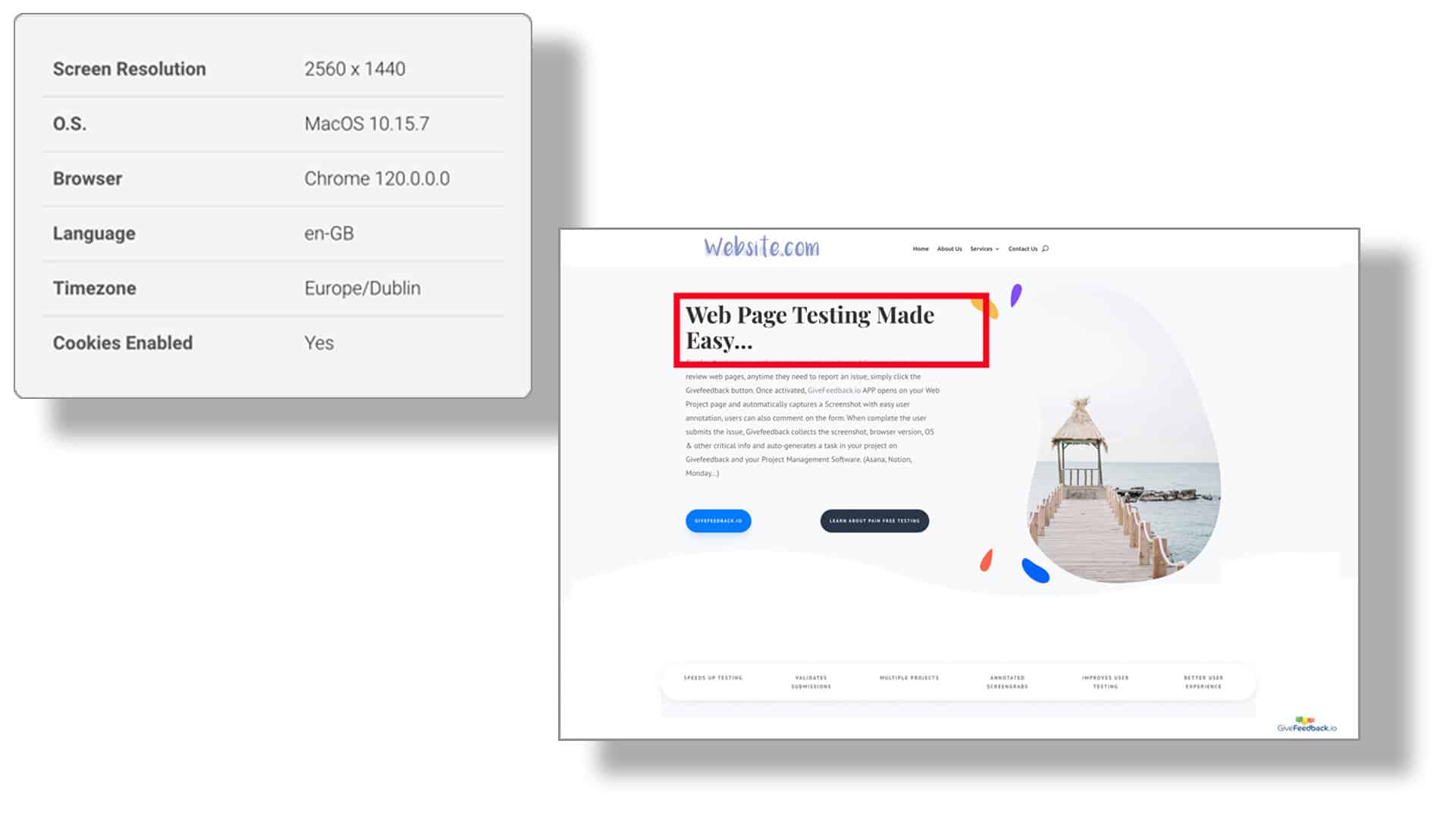
Reports land in a dashboard where you mark them open, resolved or archived, and each one can be created automatically as an issue in Jira, a card in Trello, a task in ClickUp, Asana or Wrike, an item in monday.com, a page in Notion, a message in Slack or Discord, or an email to your team. On paid plans, the status stays in sync both ways with Jira, Trello, ClickUp, Asana, monday.com, Wrike, Slack and Discord.
The Free plan covers 5 projects and 50 feedback reports; see pricing for the rest.
Whether you use a tool or the template, the rule doesn't change: one bug per report, the exact URL and setup, numbered steps, and the expected versus the actual result. Get those four right and most bugs are fixed the first time someone looks at them.
Frequently asked questions
What should a bug report include?
A specific title, the page URL, the environment (browser and version, operating system, screen size), numbered steps to reproduce, the expected result, the actual result and a marked-up screenshot. Add how often it happens and a severity, so the team can decide what to fix first. Anything a developer would otherwise have to ask belongs in the report.
What is the difference between expected and actual result?
The expected result is what should happen if the site worked correctly; the actual result is what happens instead. Writing both turns a vague complaint into something testable, and it sometimes shows that the site is working as designed and the request is really a change, not a bug.
Can I use the bug report template in Google Sheets?
Yes. Download the Excel file and open it in Google Sheets with File, then Import, then Upload. The columns, the two example rows and the severity, priority and status dropdowns are kept, so the sheet works as a shared bug log for the whole team.
How do I write a good bug report title?
Name the place and the problem in about ten words, for example "Checkout: Pay button does nothing on Safari iOS". Leave the title for last: once the steps are written, it is easier to make it specific. Avoid titles like "Bug", "Urgent" or "Site broken", which say nothing to whoever triages the list.
Should I report several bugs in one report?
No. Write one report per bug, even when they are on the same page. Separate reports can be assigned to different people, fixed in any order and closed independently, so nothing gets lost when one problem is fixed and the other is not.
Keep reading
Guides
Website Handover Checklist: 43 Items to Hand Over at Launch (Free Template)
A website handover checklist for agencies and freelancers: accounts, domain, hosting, backups, licenses and support terms, plus a free handover document.
- 12 min read

Guides
How to Choose a Website Feedback Tool (2026 Checklist)
How to choose the best website feedback tool in 2026: the tool types, 12 criteria, a free scoring template (Excel) and a one-week trial plan with a real client.
- 8 min read

Guides
How to Collect Client Feedback on a Website (Step by Step)
How to collect client feedback on a website: 5 methods compared, a review round step by step, good vs vague feedback examples and a briefing email to send today.
- 9 min read
Collect visual feedback on your next website
Visual website feedback for agencies, freelancers and their clients.
Free plan - No credit card - Set up in minutes